Google Translate Blog
The official source for news on Google's translation technologies
Breaking down the language barrier—six years in
Thursday, April 26, 2012
Cross-posted from the
Official Google Blog
.
The rise of the web has brought the world’s collective knowledge to the fingertips of more than two billion people. With just a short query you can access a webpage on a server thousands of miles away in a different country, or read a note from someone halfway around the world. But what happens if it’s in Hindi or Afrikaans or Icelandic, and you speak only English—or vice versa?
In 2001, Google started providing a service that could translate eight languages to and from English. It used what was then state-of-the-art commercial machine translation (MT), but the translation quality wasn’t very good, and it didn’t improve much in those first few years. In 2003, a few Google engineers decided to ramp up the translation quality and tackle more languages. That's when I got involved. I was working as a researcher on DARPA projects looking at a new approach to machine translation—learning from data—which held the promise of much better translation quality. I got a phone call from those Googlers who convinced me (I was skeptical!) that this data-driven approach might work at Google scale.
I joined Google, and we started to retool our translation system toward competing in the
NIST Machine Translation Evaluation
, a “bake-off” among research institutions and companies to build better machine translation. Google’s massive computing infrastructure and ability to crunch vast sets of web data gave us strong results. This was a major turning point: it underscored how effective the data-driven approach could be.
But at that time our system was too slow to run as a practical service—it took us 40 hours and 1,000 machines to translate 1,000 sentences. So we focused on speed, and a year later our system could translate a sentence in under a second, and with better quality. In early 2006, we rolled out our first languages: Chinese, then Arabic.
We announced our statistical MT approach
on April 28, 2006, and in the six years since then we’ve focused primarily on core translation quality and language coverage. We can now translate among any of 64 different languages, including many with a small web presence, such as Bengali, Basque, Swahili, Yiddish, even
Esperanto
.
Today we have more than 200 million monthly active users on
translate.google.com
(and even more in other places where you can use Translate, such as Chrome, mobile apps, YouTube, etc.). People also seem eager to access Google Translate on the go (the language barrier is never more acute than when you’re traveling)—we’ve seen our mobile traffic more than quadruple year over year. And our users are truly global: more than 92 percent of our traffic comes from outside the United States.
In a given day we translate roughly as much text as you’d find in 1 million books. To put it another way: what all the professional human translators in the world produce in a year, our system translates in roughly a single day. By this estimate, most of the translation on the planet is now done by Google Translate. (We can’t speak for the galaxy; Douglas Adams’s “
Babel fish
” probably has us beat there.) Of course, for nuanced or mission-critical translations, nothing beats a human translator—and we believe that as machine translation encourages people to speak their own languages more and carry on more global conversations, translation experts will be more crucial than ever.
We imagine a future where anyone in the world can consume and share any information, no matter what language it’s in, and no matter where it pops up. We already provide translation for webpages on the fly as you browse in Chrome, text in mobile photos, YouTube video captions, and speech-to-speech “conversation mode” on smartphones. We want to knock down the language barrier wherever it trips people up, and we can’t wait to see what the next six years will bring.
Posted by Franz Och, Distinguished Research Scientist, Google Translate
Localize your apps and content more easily -- new formats in Translator Toolkit
Friday, March 30, 2012
At Google, we put a lot of energy into helping localize the world’s information to make it more useful to more people. It’s not just about localizing our own products -- we want to provide tools that make it easy for translators and developers around the world to localize their own apps and content.
Google Translator Toolkit
is our
online translation tool
for amateur and professional translators -- it’s built on
Google Translate
and supports more than 100,000 language pairs.
This week, the Translator Toolkit team has launched support for four new translation-related file formats:
Android Resource (
.xml
)
Application Resource Bundle (
.arb
)
Chrome Extension (
.json
)
GNU gettext-based (
.po
)
With these new file formats, you can use Translator Toolkit to localize your apps and other products and content much more quickly and easily.
For example, to translate your Android application, go into the res/values directory and upload strings.xml into Translator Toolkit -- Translator Toolkit will now automatically translate it. You can then
share
your translations with amateur or professional translators, who can localize the text using Translator Toolkit’s
WYSIWYG
online editor.
When you’re finished,
you can
export
your translated application and store it in a locale-specific directory in Android.
Voilà -- easy localization! 翻译起来太方便了!
In addition, we’ve made the Translator Toolkit interface more intuitive for these new file formats so users can translate faster and more accurately. For example, you can turn on
‘Customized colors’ so translators can annotate the edited segments, ‘Number of characters in the segment’ to make sure the text doesn’t run too long (very important for mobile devices), and ‘Synchronized scrolling’ so you can scroll the original and translated text at the same time, which makes navigation much easier.
With these new file formats and UI features, along with the
file formats
we already support (.aea, .srt, .html), we hope Translator Toolkit can help you reach more users around the world.
When you’re ready, give Google Translator Toolkit a try and
suggest any improvements
you’d like to see so we can work on making it even better.
Posted by Chris Yang, Product Manager, and Haidong Shao, Software Engineer, Translator Toolkit
Using labels in Translator Toolkit
Wednesday, March 28, 2012
Google Translator Toolkit, an online translation tool built on Google Translate, greatly simplifies the translation workflow through its WYSIWYG editor, real-time collaboration and translation management system in the cloud. As amateur translators, we often use Translator Toolkit for projects like
translating Wikipedia articles
or editing subtitle files for YouTube videos. However, as we work on more and more projects at once, we’ve found we want more powerful ways to organize our Translator Toolkit documents.
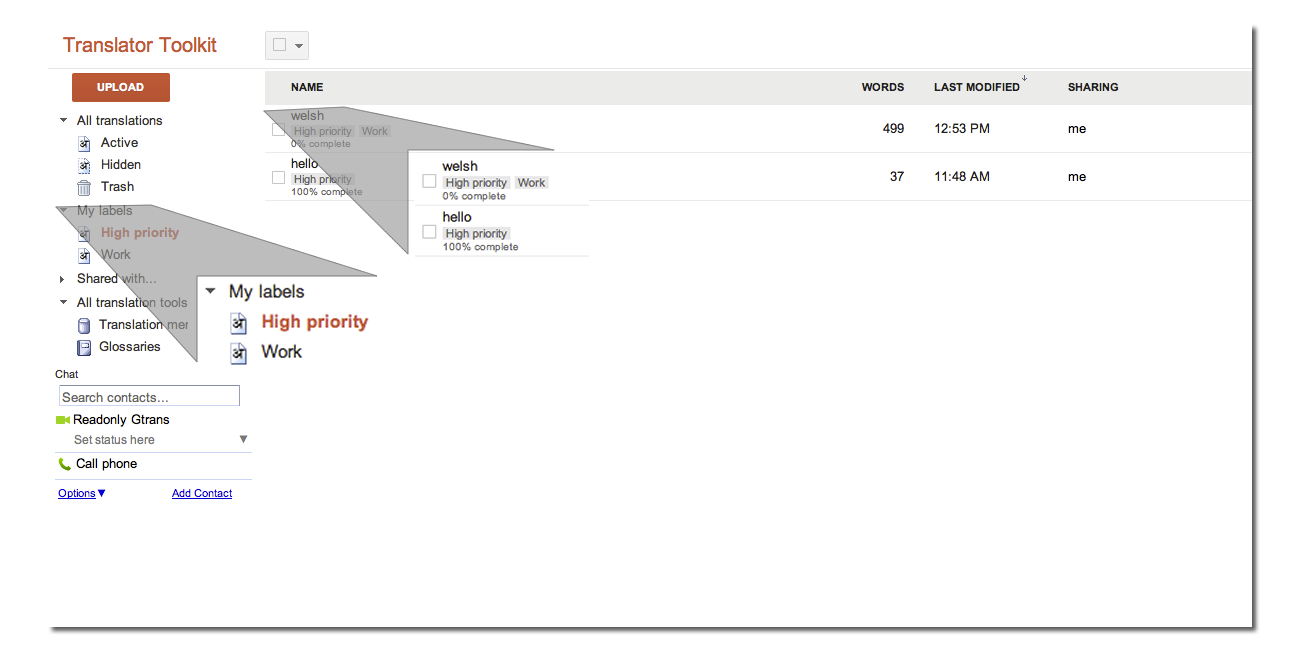
So we’re adding labels in Translator Toolkit. We’ve updated them this week, and we thought you’d enjoy a peek at the method to our madness.
With labels, you can organize your Translator Toolkit documents into any categories you define yourself -- ‘high priority,’ ‘wikipedia,’ ‘work,’ ‘later,’ etc. -- and in any combination (the beauty of labels is that they can overlap, so one document might be both ‘work’ and ‘high priority’).
To put a label on a Translator Toolkit document, just select the file and then click ‘Label’ to apply an existing label (or labels). You can also create a new label.
To access all the documents with a given label (or labels), navigate to ‘My labels’ on the left side and choose the labels you’re interested in.
Labels are just one way to make it easier to access and organize your Translator Toolkit documents. Hopefully these changes help you manage more complex projects -- please let us know if you have any
feedback
.
Posted by Chenjun Wu, Software Engineer, and Chris Yang, Product Manager, Translator Toolkit
Translating patents with the European Patent Office
Wednesday, February 29, 2012
Last March
, we signed an agreement with the European Patent Office (EPO) to break down linguistic barriers and improve the machine translation of patents. Today, we’ve released an update to our Google Translate system that incorporates the EPO’s parallel patent texts and allows translation between English and French, German, Spanish, Italian, Portuguese and Swedish.
This improved system is now part of the EPO’s
Espacenet
service, and goes under the name Patent Translate. Espacenet provides free access to millions of patent documents worldwide - and its users can use Patent Translate to read patents from around the world in their own language. Here’s a video that shows how it works:
Using the EPO’s parallel texts, we’ve been able to improve our ability to translate patents, as the following examples show:
Polymerisable ink
Source: une tête d'impression pour diriger une encre polymérisable par rayonnement vers un substrat reçu sur le support
Old translation: a print head to direct a radiation curable ink to a substrate on the support received
New translation: a print head for directing radiation polymerisable ink to a substrate received on the support
Ultrasonic vibration
Source: The crystals supply the required ultrasonic vibration needed to drive both the horn and the attached cutting tip during phacoemulsification and are controlled by the console.
Old translation: I cristalli di fornire la vibrazione necessaria ad ultrasuoni necessari per guidare sia il corno e la punta di sezionamento annesso durante facoemulsificazione e sono controllati dalla console.
New translation: I cristalli forniscono la vibrazione ultrasonica richiesta necessaria per pilotare sia il corno e la punta da taglio allegata durante la facoemulsificazione e sono controllati dalla console.
We share a similar vision to the EPO, that machine translation can help to overcome language barriers - and help to make the information contained in patents universally accessible and useful. While the improved system is pretty good, machine translation is a challenging computer science problem and does not always deliver perfect results. But it can be a very useful way for people to search and read patents that aren’t written in their language.
We’re excited to continue our collaboration with the EPO. We look forward to adding more languages - and showing how this public-private partnership will further improve access to patents for people around the world.
Posted by Jeff Chin, Product Manager, Google Translate
An easier way to type in Japanese, Vietnamese, and Hebrew
Monday, February 27, 2012
Knowing what you want to translate is sometimes only half the battle. You may have a letter from your secret admirer sitting in front of you, but if you can’t type the words into Google Translate the meaning can remain elusive.
Typing in languages which use different character sets can be a frustrating problem in computer labs, internet cafés, and sometimes even on home computers if standard
Latin alphabet keyboards
are the only option available.
To make typing in these languages easier we began including
virtual keyboards
and
transliteration
input methods in Google Translate last year, and we’ve been working to expand that support over time. Today we’re happy to announce three major additions to our input methods: Japanese, Vietnamese, and Hebrew language support.
To use transliteration input methods, just select the ‘Allow phonetic typing’ option when typing in Google Translate.
Since releasing transliteration support for these languages a few days ago, we’ve noticed significant improvements in the the speed of input (for instance, Vietnamese text input has become 20% faster with the new input method) which we hope to see translate into a better experience for everyone.
Keep an eye out over the next few months as we add support for more languages.
Would you like to use Google’s transliteration input methods or virtual keyboards across the whole web? Try out our
Chrome extension
, which includes transliteration for over 20 languages and virtual keyboards for 70 more.
Posted by C. Andrew Warren, Associate Product Manager, Internationalization Team
Tutmonda helplingvo por ĉiuj homoj
Wednesday, February 22, 2012
Today, we are adding Esperanto to Google Translate, making it our 64th supported language.
Ludovic Lazarus Zamenhof
started his quest for an easy-to-learn language shared by all people in the 1870s and first published the ideas in 1887 with his book
Unua Libro
. The concept of a common language spread quickly, and initial reactions to Esperanto have ranged from suppression to enthusiastic embrace. Now, 125 years later, Esperanto has hundreds of thousands of active speakers, millions of people with some knowledge of the language, and even a few hundred people who learned it from birth, taught by their parents.
Esperanto and Google Translate share the goal of helping people understand each other, this connection has been made even in
this blog post
. Therefore, we are very excited that we can now offer translation for this language as well.
The Google Translate team was actually surprised about the high quality of machine translation for Esperanto. As we know from many experiments, more training data (which in our case means more existing translations) tends to yield better translations. For Esperanto, the number of existing translations is comparatively small. German or Spanish, for example, have more than 100 times the data; other languages on which we focus our research efforts have similar amounts of data as Esperanto but don’t achieve comparable quality yet. Esperanto was constructed such that it is easy to learn for humans, and this seems to help automatic translation as well.
Although the system is still far from perfect, we hope that our latest addition helps you to learn more about Esperanto’s history and culture. Translation to and from Esperanto will soon be available on
translate.google.com
, in our mobile web app, and in the Google Translate app for Android and iOS.
Posted by Thorsten Brants, Research Scientist, Google Translate
Sometimes it’s easier just to write it
Wednesday, January 4, 2012
With our most recent update to
Google Translate for Android
, we’ve added an experimental new input feature: handwriting on your touchscreen.
Maybe you’d like to see if three
木 make a 森, but you don’t have a Japanese keyboard installed? Just use the handwriting icon
Our goal is to break down the language barrier, all the time, everywhere. By adding handwriting input directly into our Android app we hope to help you get translation done even more quickly and easily. Sometimes you don’t know how to say what you want translated, sometimes you can’t type it, and sometimes it’s easier just to write it. We think of handwriting on the touchscreen as another natural input that you may want to use to complement the keyboard, microphone, or
camera
.
This is still an experimental feature. It’s available in Chinese and Japanese, and
you can enable it for English, French, Italian, German, and Spanish if you like. (
We currently only support single-character input for Chinese and Japanese.) Just as with speech recognition and our translations themselves, our handwriting recognition happens in the cloud, allowing us to continually improve accuracy without requiring you to download new versions of the app.
Download Google Translate in
Android Market
— it’s available for tablets and mobile phones running Android 1.5 and up. Then, you can easily find out whether 自 really means ‘server rack with a Wi-Fi antenna’.
Posted by Daniel Keysers, Software Engineer
Labels
alpha languages
Android
api
BBC
Challenge
chrome
football
Google Goggles
Google Translate
Google Translate for Animals
I/O
integrations
Mobile
new languages
partnerships
Research
search
Search Stories
text-to-speech
toolbar
Translate Blog
Translate Community
translation quality
Translator Toolkit
transliteration
Wear
website translation element
Wikipedia
Youtube
Archive
2016
May
Apr
Feb
2015
Dec
Oct
Aug
Jul
Jun
May
Apr
Feb
Jan
2014
Dec
Oct
Jul
2013
Dec
Nov
Sep
Aug
Jul
May
Apr
Mar
Feb
2012
Dec
Oct
Sep
Aug
Jul
May
Apr
Mar
Feb
Jan
2011
Nov
Oct
Aug
Jun
May
Apr
Feb
Jan
2010
Dec
Nov
Oct
Aug
Jul
Jun
May
Apr
Mar
Feb
2009
Dec
Nov
Feed
Follow @google
Follow
Useful Links
About Translate
Translate Community
Translate for Android
Translate for iOS
Give us feedback in our
Product Forums
.




 Follow
