Google Translate Blog
The official source for news on Google's translation technologies
Everybody’s talking (and translating) with Chrome
Wednesday, April 27, 2011
(Cross-posted on the
Google Chrome Blog
)
Today, we’re excited to make a nifty feature widely available in today’s new Chrome stable release: speech input through HTML.
Curious about how speech input can be used in real life? Here’s one example: Using Chrome, you can now translate what you say into other languages with
Google Translate
. If you’re translating from English, just click on the microphone on the bottom right of the input box, speak your text, and choose the language you want to translate to. In fact, you can even click on the “
Listen
” feature to hear the translated words spoken back to you!
Speech input through HTML is one of many new web technologies in the browser that help make innovative and useful web applications like Google Translate’s speech feature possible. If you’d like to check out more examples of applications built using the latest and greatest web technologies in the browser, you can check out more than 200 submissions by web developers on
chromeexperiments.com
. If you’re not already using Chrome, don’t forget to first download Chrome at
google.com/chrome
.
Posted by Josh Estelle, Software Engineer
Listen to more languages in Google Translate for Android
Thursday, April 14, 2011
(Cross-posted on the
Google Mobile blog
)
Today we launched an update to
Google Translate for Android
that allows you to listen to translations in several more languages.
We’ve dramatically improved the quality of our spoken translations in over 15 languages, including Russian, Chinese and Portuguese, and added the ability to listen to three new languages: Japanese, Arabic and Korean. Text-to-speech is one of the most popular features of this mobile interface. Whether you’re learning how to say a foreign phrase, or trying to share information with someone in their language, simply tap the Speaker icon after doing a translation and you’ll hear the difference.
With today’s launch, Google Translate for Android supports translation between 58 languages and can speak translations in 24 languages. The application works on phones and tablets running Android 2.1 and above. To download Google Translate for Android, scan the QR code below, or visit us on the
Android Market
.
Posted by Awaneesh Verma, Product Manager
Introducing the Google Translate app for iPhone
Tuesday, February 8, 2011
Back in August 2008
, we launched a Google Translate HTML5 web app for iPhone users. Today, the official
Google Translate for iPhone app
is available for download from the App Store. The new app has all of the features of the web app, plus some significant new additions designed to improve your overall translation experience.
Speak to translate
The new app accepts voice input for 15 languages, and—just like the web app—you can translate a word or phrase into one of more than 50 languages. For voice input, just press the microphone icon next to the text box and say what you want to translate.
Listen to your translations
You can also listen to your translations spoken out loud in one of 23 different languages. This feature uses the same new speech synthesizer voices as
the desktop version of Google Translate we introduced last month
.
Full-screen mode
Another feature that might come in handy is the ability to easily enlarge the translated text to full-screen size. This way, it’s much easier to read the text on the screen, or show the translation to the person you are communicating with. Just tap on the zoom icon to quickly zoom in.
And the app also includes all of the major features of the web app, including the ability to view dictionary results for single words, access your starred translations and translation history even when offline, and support
romanized
text like Pinyin and Romaji.
You can
download Google Translate now from the App Store globally
. The app is available in all iOS supported languages, but you’ll need an iPhone or iPod touch iOS version 3 or later.
Posted by Wenzhang Zhu, Software Engineer
A new look for Google Translate for Android
Wednesday, January 12, 2011
When we launched the first version of Google Translate for Android in January 2010, we were excited about the year ahead. For the first time, we were bringing the capabilities supported on
Google Translate
—like machine translation,
romanization
of non-Roman scripts and spoken translations—to the Android platform. We also offered voice input to let you speak the word or phrase you wanted to translate instead of typing it in, and SMS translation so you could translate SMS messages sent to you in foreign languages.
Today, we’re refreshing Translate for Android with several updates to make the app easier to interact with. Among other improvements, we’ve created better dropdown boxes to help select the languages you want to translate from and into, an improved input box, and cleaner icons and layout.
We also want to let you in on an experimental feature that’s still in its earliest stages—Conversation Mode. This is a new interface within Google Translate that’s optimized to allow you to communicate fluidly with a nearby person in another language. You may have seen an
early demo
a few months ago, and today you can try it yourself on your Android device.
Currently, you can only use Conversation Mode when translating between English and Spanish. In conversation mode, simply press the microphone for your language and start speaking. Google Translate will translate your speech and read the translation out loud. Your conversation partner can then respond in their language, and you’ll hear the translation spoken back to you. Because this technology is still in alpha, factors like regional accents, background noise or rapid speech may make it difficult to understand what you’re saying. Even with these caveats, we’re excited about the future promise of this technology to be able to help people connect across languages.
As Android devices have spread across the globe, we’ve seen Translate for Android used all over. The majority of our usage now comes from outside the United States, and we’ve seen daily usage from more than 150 countries, from Malaysia to Mexico to Mozambique. It’s really rewarding for us to see how this new platform is helping us break down language barriers the world over.
Translate supports 53 languages, from Afrikaans to Yiddish, and voice input for 15 languages. You can download the application, available for devices running Android 2.1 and above, by searching for “Google Translate” in Android Market or by scanning the QR Code below.
Posted by Awaneesh Verma, Product Manager
Listen to us now!
Thursday, December 16, 2010
One of the features of Google Translate that users enjoy the most is the ability to listen to the text they have just translated in audio form. To play an audio version of the translated text we use a speech synthesizer, a computer algorithm that converts text to speech. Today, we have launched new speech synthesizer voices.
The new voices are available in three new languages — Arabic, Japanese, and Korean — and provide dramatic quality improvements for 17 other languages: Czech, Chinese, Danish, Dutch, Finnish, French, German, Greek, Hungarian, Italian, Norwegian, Polish, Portuguese, Russian, Spanish, Swedish, and Turkish.
So go ahead. Visit
Google Translate
and try a sentence or two. We hope you like our new voices. And for the
beatboxing
f
ans who used our old German voice: give it a try — it may still work... Have fun!
Posted by Alex Salcianu, Software Engineer
When one translation just isn’t enough
Wednesday, December 15, 2010
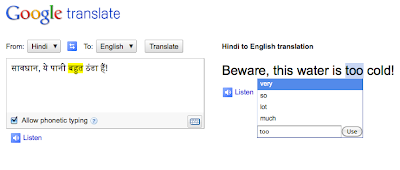
When you come to Google Translate, we always do our best to give you the most accurate translation our system can produce. However, sometimes translation can be pretty tough. Language is full of ambiguities and our system has to do its best to make the right choices. So why choose?
We’ve launched a new feature to provide you with alternate translations for each phrase in the translated text. Just click the translated phrase and you’ll see a pop-up menu of possible alternates for that phrase, as well as the original phrase highlighted in your original text. Not only can these alternative translations give you a better understanding of a confusing translation, but they also allow you to help Google choose the best alternative when we make a mistake.
This new feature is powered by harnessing the vast knowledge within our statistical machine translation system. Typically, when we produce a translation, our system searches through millions of possible translations, selecting the best -- that is, the most statistically likely -- translation. With this feature, we expose more of those possible alternatives. For more information about how our system works, check out http://translate.google.com/about/.
By using this feature, you can help improve Google Translate. Selecting phrase-level alternatives gives us feedback that fits well within the our system’s statistical models. We hope to incorporate this structured feedback into our system, improving translation quality over time.
We hope this makes our translations even more useful to you, and allows you to help us help you find the best translation possible!
Posted by Josh Estelle, Senior Software Engineer
On-screen Keyboards on Google Translate
Tuesday, December 14, 2010
Today Google Translate supports translation between almost sixty languages, but typing many of those on a standard
QWERTY
keyboard ranges from difficult to impossible. That’s why today we’re happy to announce the addition of
on-screen keyboards
to Google Translate. Whether you’re a native Georgian (ქართული ენა) speaker travelling abroad, or a student learning German with no way to type those tricky umlauts (ü), we hope this new feature will come to your rescue.
You’ll notice a small keyboard icon in the bottom corner of the text input box. Click this to open a virtual keyboard for the selected input language. You can either click the letters on the on-screen keyboard, or type using your real keyboard while the on-screen keyboard is visible.
Some languages such as Vietnamese and Armenian have more than one popular layout for local keyboards. Our on-screen keyboards support multiple layouts too, and you can switch between these layouts by clicking on the arrows at the top of the on-screen keyboard
To close the on-screen keyboard, simple click the small keyboard icon again.
With this launch, we’ve added on-screen keyboards for these languages: Afrikaans, Albanian, Arabic, Armenian, Basque, Belarusian, Bulgarian, Catalan, Croatian, Czech, Danish, Dutch, Estonian, Filipino, Finnish, French, Galician, Georgian, German, Greek, Haitian Creole, Hebrew, Hindi, Hungarian, Icelandic, Indonesian, Irish, Italian, Korean, Latvian, Lithuanian, Macedonian, Malay, Maltese, Norwegian, Persian, Polish, Portuguese, Romanian, Russian, Serbian, Slovak, Slovenian, Spanish, Swahili, Swedish, Thai, Turkish, Ukrainian, Urdu, Vietnamese, Welsh, and Yiddish.
Some of you may be familiar with our “Phonetic typing” feature - for a few languages such as Arabic, you can type a word as it would sound in English (e.g. “
marhaban”
), and see the letters transformed to Arabic (e.g. مرحبا) before being translated. The new on-screen keyboards do not interfere with phonetic typing for languages that support both – when the keyboard is open, phonetic typing will be disabled.
We hope that this latest addition to Google Translate will make writing and communicating in foreign languages even easier. Please let us know if you have any feedback in our
discussion group
.
Posted by Frank Yung-Fong Tang, Senior Software Engineer
Labels
alpha languages
Android
api
BBC
Challenge
chrome
football
Google Goggles
Google Translate
Google Translate for Animals
I/O
integrations
Mobile
new languages
partnerships
Research
search
Search Stories
text-to-speech
toolbar
Translate Blog
Translate Community
translation quality
Translator Toolkit
transliteration
Wear
website translation element
Wikipedia
Youtube
Archive
2016
May
Apr
Feb
2015
Dec
Oct
Aug
Jul
Jun
May
Apr
Feb
Jan
2014
Dec
Oct
Jul
2013
Dec
Nov
Sep
Aug
Jul
May
Apr
Mar
Feb
2012
Dec
Oct
Sep
Aug
Jul
May
Apr
Mar
Feb
Jan
2011
Nov
Oct
Aug
Jun
May
Apr
Feb
Jan
2010
Dec
Nov
Oct
Aug
Jul
Jun
May
Apr
Mar
Feb
2009
Dec
Nov
Feed
Follow @google
Follow
Useful Links
About Translate
Translate Community
Translate for Android
Translate for iOS
Give us feedback in our
Product Forums
.




 Follow